

The n8n workflows every solo founder should run
Seven concrete n8n workflows that replace the part-time jobs a solo founder can't hire for — onboarding, lead capture, failed-payment alerts, daily digests, support triage, repurposing and backups — plus how to build ones that don't break.
TL;DR — Most of running a business isn't building product; it's moving information between systems. These are the seven n8n workflows we'd build first as a team of one, the five-part anatomy that keeps them from breaking silently, and the honest limits of automating your own operations.
There's a particular kind of exhaustion that comes from being a company of one. Not the work itself — the shuffling. Copying a new customer's details from Stripe into your database. Pasting a lead from a form into your CRM. Checking four dashboards to see if yesterday was good. None of it is hard. All of it is endless.
This is the tax we wrote about in automate it or do it manually: knowledge workers lose roughly a quarter of the working week to repetitive manual tasks. For a solo founder that tax is existential, because every hour spent shuffling data is an hour not spent on the product or the customer.
n8n is the tool we reach for to pay less of it. It's a fair-code workflow automation platform with 400+ built-in nodes and — counting community packages — well over a thousand available integrations, plus 30+ dedicated AI nodes and native MCP support as of 2026. Self-hosted, the Community edition runs with no workflow or execution limits, which makes it a genuinely cheap piece of leverage.
Below are the seven workflows worth building first. Not clever ones — load-bearing ones.
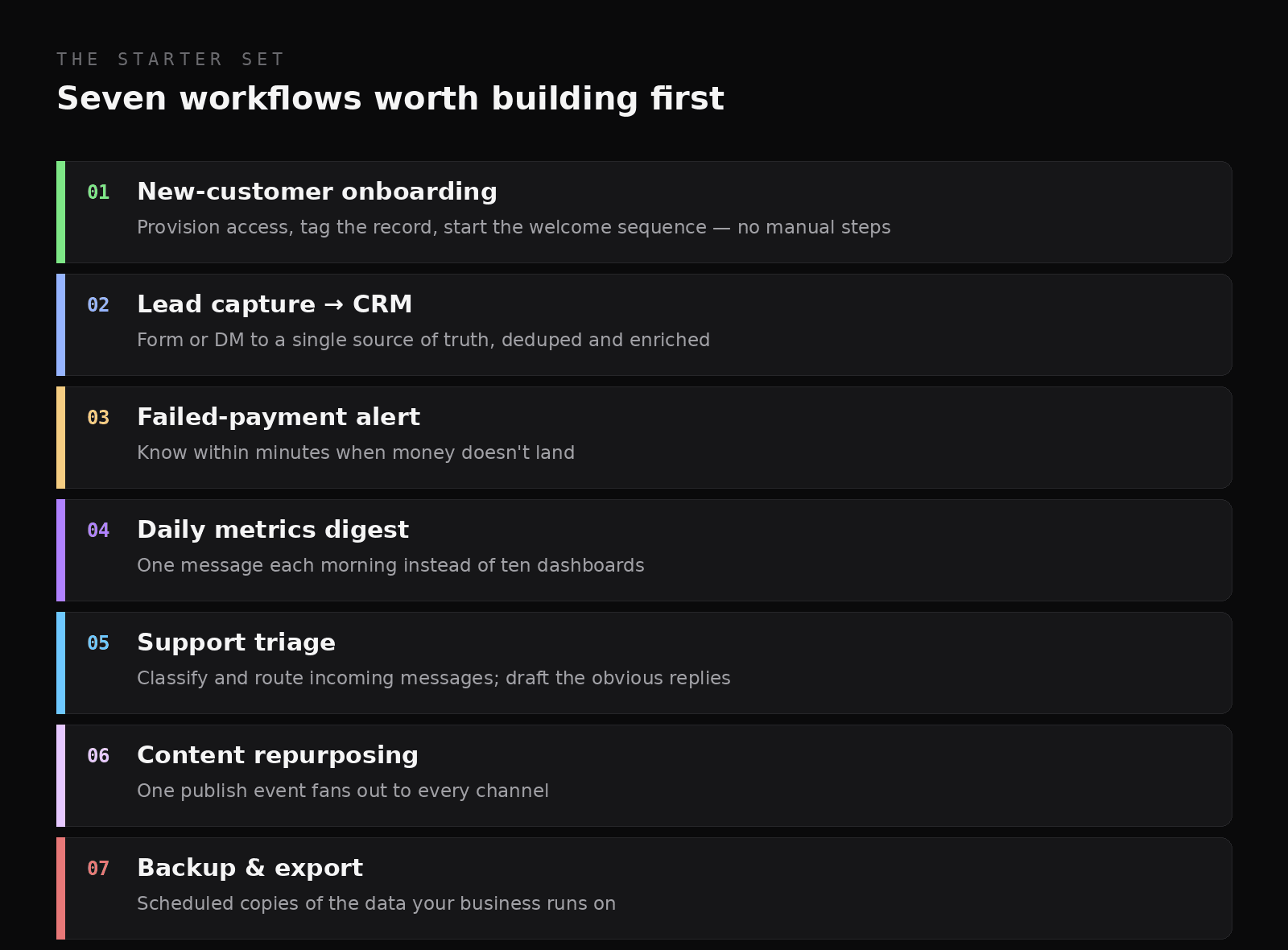
The starter set — each one replaces a job you'd otherwise do by hand, forever.
1. New-customer onboarding
Trigger: a successful payment or signup.
This is the highest-value automation for almost every business, because it's the one that runs at the exact moment a customer is paying most attention. The workflow provisions access, creates or updates the customer record, tags them by plan and source, kicks off the welcome sequence, and posts a note to your own channel so you know a human joined.
Done by hand, this is five minutes of clicking per customer, and it's always done late — evenings, weekends, while you're mid-task on something else. Automated, it's instant and identical every time. And speed matters here beyond convenience: as we covered in why paid communities churn, if a new member doesn't reach first value quickly, they start questioning the purchase almost immediately. Onboarding is retention work disguised as admin.
2. Lead capture → one source of truth
Trigger: a form submission, a DM, a newsletter signup, a demo request.
Leads arrive through irritatingly many doors, and the failure mode isn't losing them dramatically — it's letting them sit in an inbox until they've gone cold. This workflow normalises every inbound source into one place: dedupe against existing records, enrich with whatever you can (company, source, campaign), tag, and notify you if the lead looks high-intent.
The discipline that makes it work is having one destination. Two half-maintained CRMs are worse than one imperfect one, because you stop trusting either.
3. Failed-payment alerts
Trigger: a payment or renewal failure webhook.
Failed payments are money you already earned walking out of a door you didn't know was open — and they're not marginal. Recurly's research puts involuntary churn at 20–40% of all subscription churn, most of it recoverable, because these customers never decided to leave.
At minimum, this workflow tells you within minutes when a charge fails, with the customer, the amount and the reason. Better, it also triggers a calm, deep-linked nudge so the customer can fix their card in one tap. (This is the exact motion the Retain module of our York Revenue Suite automates for Whop sellers, with conservative attribution so you can see what the nudge actually recovered.)
4. The daily metrics digest
Trigger: a schedule — once each morning.
You cannot watch ten dashboards, and you shouldn't try. This workflow pulls the handful of numbers that actually change your decisions — revenue, signups, churn, active users, error count — and delivers them as a single message to Slack, Telegram or email.
The principle is be notified, not vigilant. A daily digest replaces a dozen anxious tab-checks with one deliberate read, and because it arrives whether the news is good or bad, it doubles as a heartbeat: if the digest doesn't show up, something's broken.
5. Support triage
Trigger: an inbound message or ticket.
This is where n8n's AI nodes earn their keep. The workflow classifies each incoming message (bug, billing, feature request, pre-sales), routes or tags it, and drafts a reply for the common cases. Crucially, you still send it — the automation gets you to a draft, and a human keeps the judgement, which is the pattern we trust for anything customer-facing.
The gain is less about speed than about calm: arriving to a pre-sorted queue with drafts waiting is a fundamentally different morning than arriving to forty unread messages.
6. Content repurposing
Trigger: publishing something new.
Publish once, distribute everywhere — automatically. When a post goes live, the workflow can generate draft social variants, update an index or newsletter section, notify your community, and log it for later reference.
This one directly serves the point of our distribution piece: builders under-invest in distribution because it feels like performing. Automating the mechanical half means the only thing left is the judgement call on what to say — which is the part worth your time.
7. Backups and exports
Trigger: a schedule — nightly or weekly.
Unglamorous and non-negotiable. Scheduled exports of your database, your workflow definitions, your customer list, your content — to storage you control. The workflow that takes twenty minutes to build is the one that saves your business the week something gets corrupted or deleted.
One rule: a backup you've never restored is a hope, not a backup. Test it once, deliberately, so you know the file is actually usable.
The anatomy of a workflow that doesn't break
Here's the part most tutorials skip. Building a workflow that works on a good day is easy. Building one you can trust for a year takes five parts.
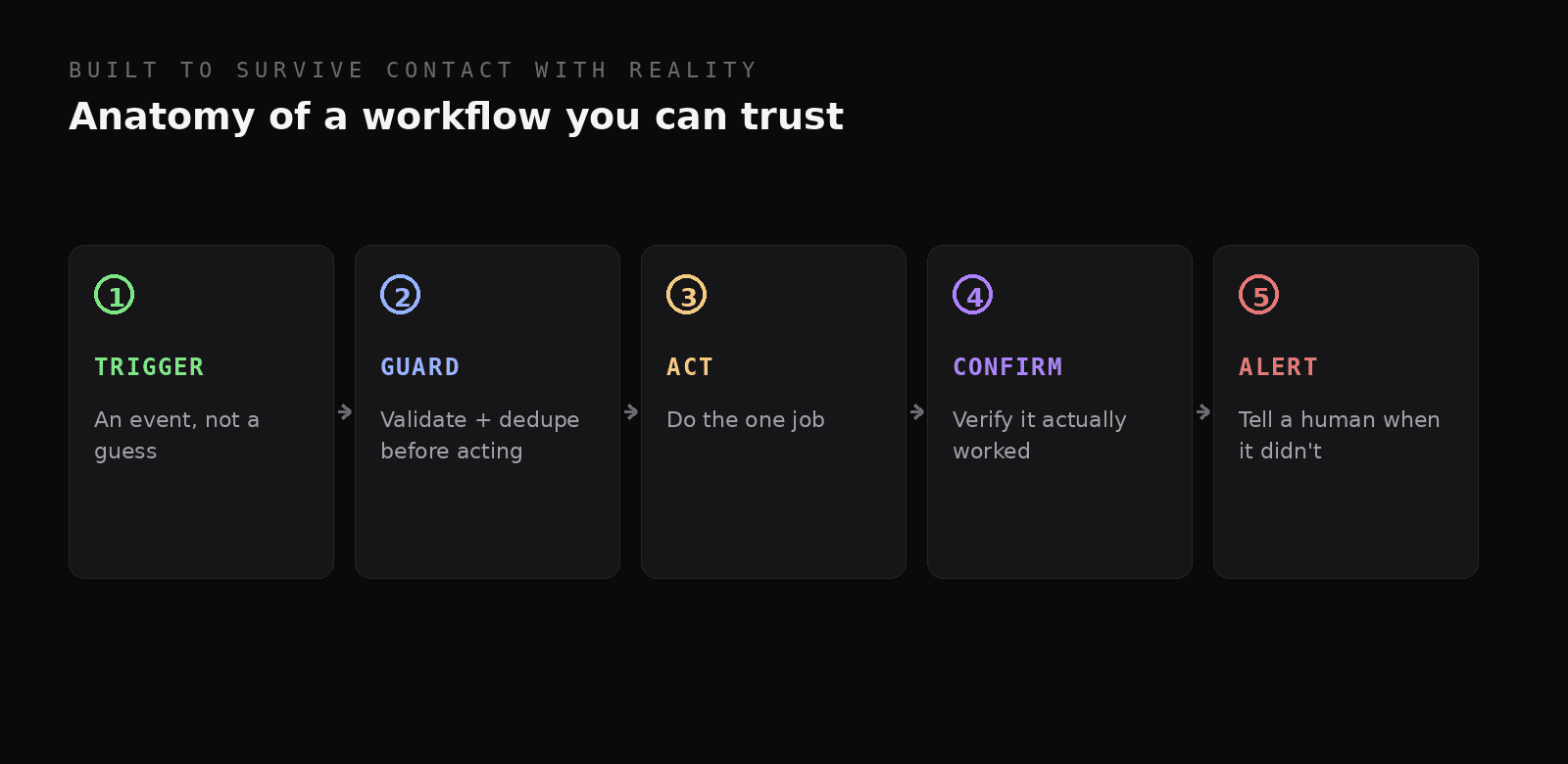
Five parts of a workflow that survives contact with reality.
- Trigger on an event, not a guess. Webhooks beat polling wherever they're available: they fire when something actually happened, rather than asking "anything new?" every five minutes and hoping the timing lines up.
- Guard before you act. Validate the payload and dedupe against what you've already processed. Webhooks get retried, forms get double-submitted, and an automation that acts twice on one event is how a customer gets charged twice or emailed twice.
- Do one job. Resist the urge to build one mega-workflow that does everything. Small, single-purpose workflows are easier to debug, and when one breaks it doesn't take the other six with it.
- Confirm the outcome. Don't assume the API call worked because the node went green. Check that the record exists, the email was accepted, the file was written.
- Alert a human when it fails. Every workflow needs an error path that reaches you. A workflow that fails loudly is an inconvenience; one that fails silently is a liability.
The failure mode nobody plans for
Which brings us to the uncomfortable truth about running your business on automations: they fail silently by default.
A broken workflow doesn't throw up an error page for a customer to complain about. The lead routing just… stops. The onboarding sequence quietly doesn't fire. The nightly backup writes an empty file. Everything looks fine — the server is up, the dashboard is green — and meanwhile the work isn't happening. We've written about this at length in monitoring n8n in production: the question that matters isn't "is the server up?" but did the work actually happen, correctly, recently?
The subtlest version is the "successful" failure: a node returns 200 with an empty body because an upstream API changed its response shape. Your workflow marches on happily, processing nothing. No error, no alert, no data.
That gap is exactly why we built FlowVitals — it watches n8n executions rather than uptime, catches silent and broken runs, alerts the channel you actually read, and keeps versioned backups of your workflows so a bad edit is one rollback from fixed. If automations are running your business, treat them like production software.
Where to start (and where to stop)
Don't build all seven this week. Pick the one that costs you the most time or the most money right now — for most people that's onboarding or failed payments — and build just that. Then reinvest the hours you save into the next bottleneck. That's how the compounding works.
And keep the decision rule in mind: automate work that's repetitive, well-defined and low-stakes to get slightly wrong. Keep the creative, ambiguous and high-stakes work human. A workflow that fires once a year isn't worth maintaining, and one that emails your entire list needs a human finger on the trigger.
The takeaways
- Most of running a business is moving information between systems — that's what n8n is for.
- Build in this order: onboarding, lead capture, failed-payment alerts, daily digest, support triage, repurposing, backups.
- Every reliable workflow has five parts: trigger on an event, guard, do one job, confirm, alert on failure.
- Automations fail silently by default — including "successful" runs that quietly process nothing. Monitor executions, not uptime.
- Start with the single most expensive manual task; reinvest the saved hours into the next one.
Running n8n workflows your business depends on? See FlowVitals or tell us what you've automated.
References
- n8n — product overview and documentation.
- VPS.us (2026). How many n8n integrations are there? — node and integration counts.
- Recurly. Churn Rate Guide — involuntary churn share.
- Smartsheet. Workers waste a quarter of the work week on manual, repetitive tasks.