

Automate it or do it manually? The decision rule for solo founders
Not everything should be automated. The rule we use at York Studio: automate the repetitive, well-defined and low-stakes work — and keep the creative, ambiguous and high-stakes work human.
TL;DR — Automation is leverage, but automating the wrong things wastes time or causes real damage. Our rule: automate work that's repetitive, well-defined and low-stakes; keep work that's creative, ambiguous or high-stakes human. Here's how to apply it.
When you're a company of one, automation is the closest thing you have to hiring. But the instinct to "automate everything" is a trap. Some work genuinely should be handed to a machine; some work is actively made worse by it. Knowing the difference is one of the highest-leverage skills a solo founder can develop.
The hidden tax of manual work
First, the case for automating something. The amount of time knowledge workers lose to repetitive manual tasks is staggering. Smartsheet found that workers waste roughly a quarter of their work week on manual, repetitive tasks, and research compiled by ProcessMaker found that 94% of workers perform repetitive, time-consuming tasks that could be partly or fully automated. Asana's Anatomy of Work research puts a sharp point on it: people spend a large share of their day on "work about work" rather than the skilled work they were hired for.
For a solo founder, that tax is existential. Every hour spent copy-pasting between tools is an hour not spent on the product or the customer. So the default should lean toward automating — but not blindly.
The trap: automating everything
Over-automation has its own costs. Building and maintaining an automation takes time; if the task is rare or always changing, you'll spend more effort maintaining the workflow than you'd ever have spent just doing it. Worse, automation amplifies whatever you point it at — a manual mistake affects one record, but an automated mistake affects ten thousand, instantly. Some work is also simply better with a human's judgement in the loop, and removing them quietly degrades quality in ways you won't notice until a customer does.
So the question isn't "can I automate this?" — almost anything can be automated. It's "should I?"
The decision rule
Here's the test we apply at York Studio. Automate a task when it's all three of these:
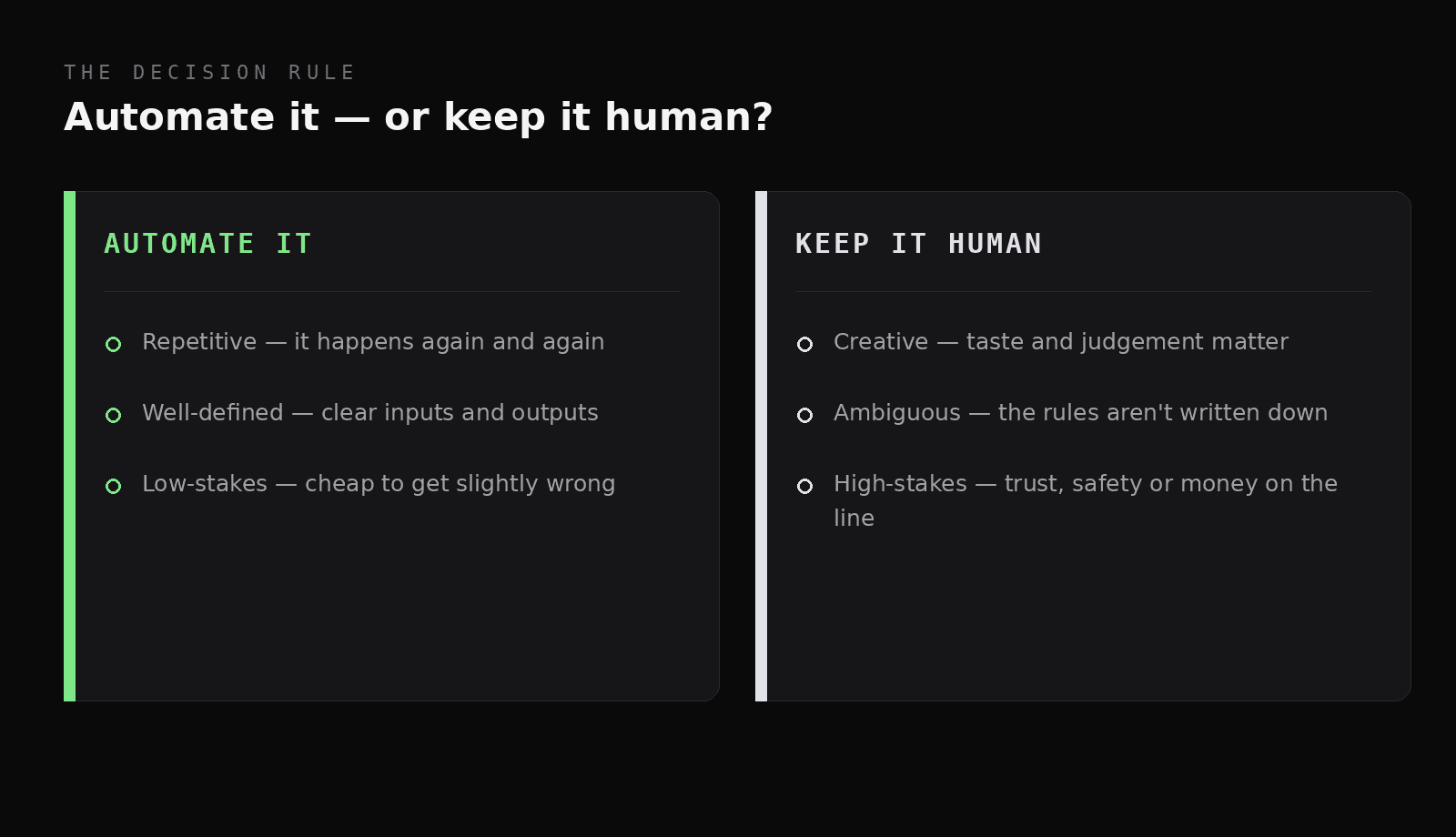
The rule: automate the repetitive, well-defined and low-stakes; keep the rest human.
- Repetitive — it happens often enough that the time you save repays the time to build it. A once-a-year task rarely qualifies.
- Well-defined — the inputs and outputs are clear and stable. If the rules change constantly, the automation will break constantly.
- Low-stakes to get slightly wrong — an occasional error is cheap to catch and fix, not catastrophic.
When all three hold, automate without hesitation: data syncing between tools, onboarding sequences, report generation, backups, first-draft content. This is the glue work that tools like n8n exist for, and it's the "Automate" layer of the solo-founder stack.
What to keep human
The mirror image of the rule tells you what not to automate. Keep a human firmly in charge when the work is:
- Creative — where taste and judgement are the point: positioning, naming, the actual design decisions.
- Ambiguous — where the rules aren't written down and each case is a little different, like a tricky customer situation.
- High-stakes — where trust, safety, legal exposure or real money are on the line, and a confident-but-wrong automated action does lasting damage.
AI shifts this line — it can now draft creative and ambiguous work surprisingly well — but drafting isn't deciding. The pattern that works is "AI drafts, human approves": you get the speed of automation on the first 80% and keep human judgement on the final call.
In practice: our automate / keep-human split
To make it concrete, here's roughly how the rule sorts the actual work of running York Studio.
Automated: new-user provisioning and onboarding emails, syncing data between billing, CRM and database, scheduled backups, deploy pipelines, uptime and workflow monitoring, first drafts of release notes and social posts, and routine replies to common support questions.
Kept human: pricing and packaging, product and brand design, the first conversation with an early customer, anything touching refunds or account security, and the call on what to build next.
Notice the pattern. The automated column is all plumbing — high-frequency, well-understood, low-judgement. The human column is all taste and trust — the things a customer actually attributes to "you." The goal isn't to remove yourself from the business; it's to remove yourself from the parts that don't need you, so you have the attention for the parts that do.
A quick test before you automate
Before building any automation, we run it through three questions:
- How often does this really happen? If it's rare, just do it manually.
- How stable are the rules? If they change monthly, the automation becomes maintenance debt.
- What's the blast radius if it goes wrong? The bigger the damage, the more human oversight (and monitoring) it needs — or the more it should stay manual.
If it's frequent, stable and safe, automate it. If it fails any of those, either keep it manual or keep a human in the loop.
When automation needs a babysitter
One more rule: anything you automate at scale needs monitoring, because silent failure is the default failure mode of automation. An automated workflow that quietly stops working can do damage for weeks before you notice. That's the whole reason observability sits inside the foundation for us, and why we built FlowVitals — automation you can't see is automation you can't trust.
The takeaways
- Automating the wrong things wastes time or causes damage — "automate everything" is a trap.
- Automate when a task is repetitive, well-defined, and low-stakes to get slightly wrong.
- Keep creative, ambiguous, and high-stakes work human — use "AI drafts, human approves."
- Run every candidate through three questions: how often, how stable, how big the blast radius.
- Whatever you automate at scale, monitor it — silent failure is automation's default.
Figuring out what to automate in your own business? Tell us what you're working on.
References
- Smartsheet. Workers waste a quarter of the work week on manual, repetitive tasks.
- ProcessMaker (2024). Repetitive Tasks at Work: Research and Statistics.
- Asana. Anatomy of Work.